 ---
## Overview
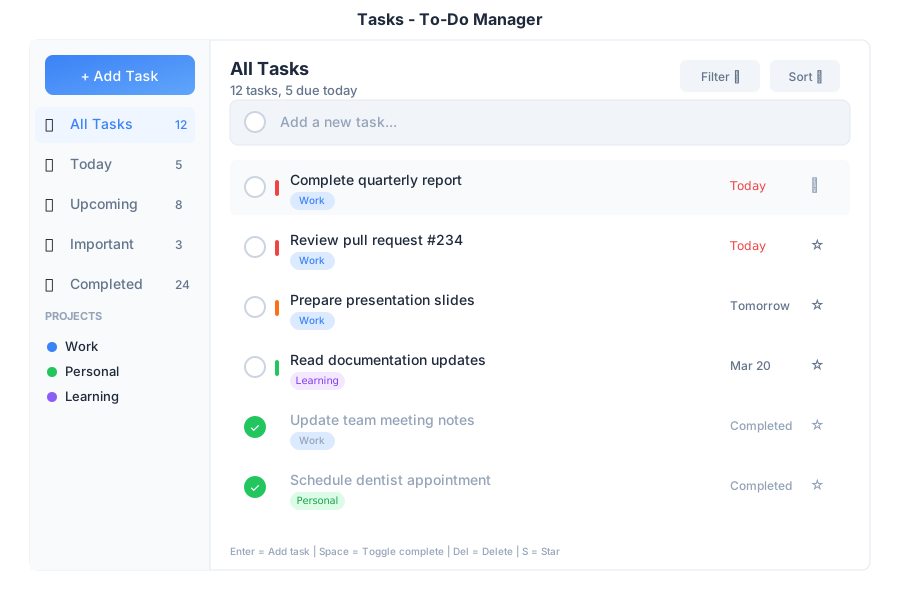
Tasks is your to-do list manager within General Bots Suite. Create tasks, set priorities, organize by category, and track your progress. Built with HTMX for instant updates without page reloads.
---
## Features
### Adding Tasks
**Quick Add:**
1. Type task description in the input box
2. Press **Enter** or click **+ Add**
**With Details:**
1. Type task description
2. Select a category (optional)
3. Pick a due date (optional)
4. Click **+ Add**
### Priority Levels
| Priority | Icon | When to Use |
|----------|------|-------------|
| **High** | 🔴 | Must do today |
| **Medium** | 🟡 | Important but not urgent |
| **Low** | 🟢 | Can wait |
| **None** | ⚪ | No deadline |
### Categories
| Category | Icon |
|----------|------|
| Work | 💼 |
| Personal | 🏠 |
| Shopping | 🛒 |
| Health | ❤️ |
| Custom | 🏷️ |
### Filter Tabs
| Tab | Shows |
|-----|-------|
| **All** | All tasks |
| **Active** | Uncompleted tasks |
| **Completed** | Done tasks |
| **Priority** | High priority only |
---
## Keyboard Shortcuts
| Shortcut | Action |
|----------|--------|
| `Enter` | Add task (when in input) |
| `Space` | Toggle task completion |
| `Delete` | Remove selected task |
| `Tab` | Move to next field |
| `Escape` | Cancel editing |
| `↑` / `↓` | Navigate tasks |
---
## Creating Tasks from Chat
---
## Overview
Tasks is your to-do list manager within General Bots Suite. Create tasks, set priorities, organize by category, and track your progress. Built with HTMX for instant updates without page reloads.
---
## Features
### Adding Tasks
**Quick Add:**
1. Type task description in the input box
2. Press **Enter** or click **+ Add**
**With Details:**
1. Type task description
2. Select a category (optional)
3. Pick a due date (optional)
4. Click **+ Add**
### Priority Levels
| Priority | Icon | When to Use |
|----------|------|-------------|
| **High** | 🔴 | Must do today |
| **Medium** | 🟡 | Important but not urgent |
| **Low** | 🟢 | Can wait |
| **None** | ⚪ | No deadline |
### Categories
| Category | Icon |
|----------|------|
| Work | 💼 |
| Personal | 🏠 |
| Shopping | 🛒 |
| Health | ❤️ |
| Custom | 🏷️ |
### Filter Tabs
| Tab | Shows |
|-----|-------|
| **All** | All tasks |
| **Active** | Uncompleted tasks |
| **Completed** | Done tasks |
| **Priority** | High priority only |
---
## Keyboard Shortcuts
| Shortcut | Action |
|----------|--------|
| `Enter` | Add task (when in input) |
| `Space` | Toggle task completion |
| `Delete` | Remove selected task |
| `Tab` | Move to next field |
| `Escape` | Cancel editing |
| `↑` / `↓` | Navigate tasks |
---
## Creating Tasks from Chat