 ---
## Overview
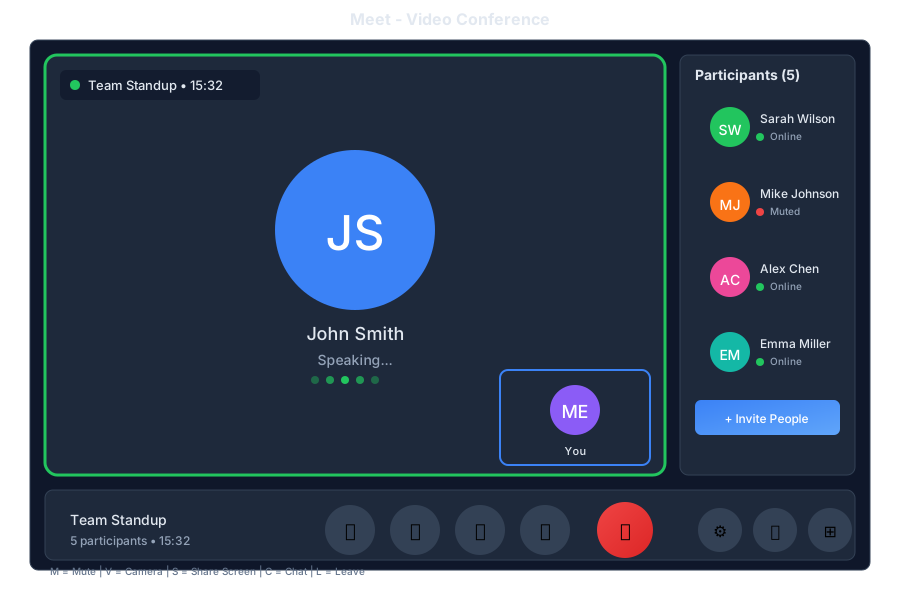
Meet is the video conferencing app in General Bots Suite. Host video calls, share your screen, collaborate in real-time, and let the AI take notes for you. Meet integrates seamlessly with Calendar so joining meetings is just one click away.
---
## Features
### Meeting Controls
| Control | Description |
|---------|-------------|
| 🎤 Mute | Toggle microphone |
| 📹 Video | Toggle camera |
| 🖥️ Share | Share screen |
| ✋ Raise Hand | Get attention |
| 💬 Chat | In-meeting chat |
| 👥 Participants | View attendees |
| ⚙️ Settings | Audio/video settings |
| 📞 Leave | End call |
### Meeting Features
| Feature | Description |
|---------|-------------|
| **Screen Sharing** | Share your entire screen or specific window |
| **Recording** | Record meetings for later review |
| **Chat** | Send messages during the meeting |
| **Reactions** | Quick emoji reactions |
| **Raise Hand** | Queue to speak |
| **Breakout Rooms** | Split into smaller groups |
| **AI Notes** | Automatic meeting notes |
| **Transcription** | Live captions |
### Layouts
| Layout | Best For |
|--------|----------|
| **Gallery** | Group discussions |
| **Speaker** | Presentations |
| **Sidebar** | Screen sharing |
| **Spotlight** | Featured speaker |
---
## Keyboard Shortcuts
| Shortcut | Action |
|----------|--------|
| `M` | Toggle mute |
| `V` | Toggle video |
| `S` | Share screen |
| `H` | Raise/lower hand |
| `C` | Toggle chat |
| `P` | Toggle participants |
| `R` | Start/stop recording |
| `Space` | Push to talk (when muted) |
| `Escape` | Exit fullscreen |
---
## Meetings via Chat
### Starting a Meeting
---
## Overview
Meet is the video conferencing app in General Bots Suite. Host video calls, share your screen, collaborate in real-time, and let the AI take notes for you. Meet integrates seamlessly with Calendar so joining meetings is just one click away.
---
## Features
### Meeting Controls
| Control | Description |
|---------|-------------|
| 🎤 Mute | Toggle microphone |
| 📹 Video | Toggle camera |
| 🖥️ Share | Share screen |
| ✋ Raise Hand | Get attention |
| 💬 Chat | In-meeting chat |
| 👥 Participants | View attendees |
| ⚙️ Settings | Audio/video settings |
| 📞 Leave | End call |
### Meeting Features
| Feature | Description |
|---------|-------------|
| **Screen Sharing** | Share your entire screen or specific window |
| **Recording** | Record meetings for later review |
| **Chat** | Send messages during the meeting |
| **Reactions** | Quick emoji reactions |
| **Raise Hand** | Queue to speak |
| **Breakout Rooms** | Split into smaller groups |
| **AI Notes** | Automatic meeting notes |
| **Transcription** | Live captions |
### Layouts
| Layout | Best For |
|--------|----------|
| **Gallery** | Group discussions |
| **Speaker** | Presentations |
| **Sidebar** | Screen sharing |
| **Spotlight** | Featured speaker |
---
## Keyboard Shortcuts
| Shortcut | Action |
|----------|--------|
| `M` | Toggle mute |
| `V` | Toggle video |
| `S` | Share screen |
| `H` | Raise/lower hand |
| `C` | Toggle chat |
| `P` | Toggle participants |
| `R` | Start/stop recording |
| `Space` | Push to talk (when muted) |
| `Escape` | Exit fullscreen |
---
## Meetings via Chat
### Starting a Meeting