 ---
## Overview
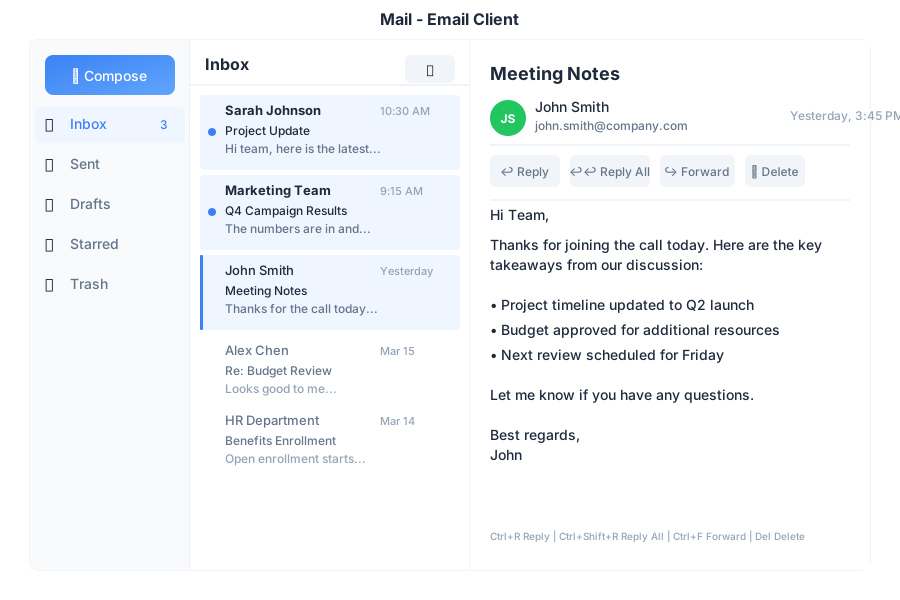
Mail is the email application in General Bots Suite. Read, compose, and organize your emails with AI assistance. Mail helps you write better emails, find important messages, and stay on top of your inbox without the clutter.
---
## Features
### Folders
| Folder | Description |
|--------|-------------|
| 📥 Inbox | Incoming messages |
| ⭐ Starred | Important emails |
| 📤 Sent | Sent messages |
| 📝 Drafts | Unsent drafts |
| 🗑️ Trash | Deleted emails |
### Labels
| Label | Icon | Use For |
|-------|------|---------|
| Urgent | 🔴 | Time-sensitive |
| Personal | 🟢 | Private emails |
| Work | 🔵 | Professional |
| Finance | 🟡 | Bills & money |
| Custom | 🟣 | Create your own |
### Email Actions
| Action | Description |
|--------|-------------|
| **Reply** | Respond to sender |
| **Reply All** | Respond to all recipients |
| **Forward** | Send to someone else |
| **Archive** | Remove from inbox |
| **Star** | Mark as important |
| **Label** | Organize with labels |
| **Delete** | Move to trash |
---
## Keyboard Shortcuts
| Shortcut | Action |
|----------|--------|
| `C` | Compose new email |
| `R` | Reply |
| `A` | Reply all |
| `F` | Forward |
| `E` | Archive |
| `S` | Star/unstar |
| `Delete` | Move to trash |
| `Ctrl+Enter` | Send email |
| `Escape` | Close/cancel |
| `↑` / `↓` | Navigate emails |
---
## Email via Chat
### Checking Your Inbox
---
## Overview
Mail is the email application in General Bots Suite. Read, compose, and organize your emails with AI assistance. Mail helps you write better emails, find important messages, and stay on top of your inbox without the clutter.
---
## Features
### Folders
| Folder | Description |
|--------|-------------|
| 📥 Inbox | Incoming messages |
| ⭐ Starred | Important emails |
| 📤 Sent | Sent messages |
| 📝 Drafts | Unsent drafts |
| 🗑️ Trash | Deleted emails |
### Labels
| Label | Icon | Use For |
|-------|------|---------|
| Urgent | 🔴 | Time-sensitive |
| Personal | 🟢 | Private emails |
| Work | 🔵 | Professional |
| Finance | 🟡 | Bills & money |
| Custom | 🟣 | Create your own |
### Email Actions
| Action | Description |
|--------|-------------|
| **Reply** | Respond to sender |
| **Reply All** | Respond to all recipients |
| **Forward** | Send to someone else |
| **Archive** | Remove from inbox |
| **Star** | Mark as important |
| **Label** | Organize with labels |
| **Delete** | Move to trash |
---
## Keyboard Shortcuts
| Shortcut | Action |
|----------|--------|
| `C` | Compose new email |
| `R` | Reply |
| `A` | Reply all |
| `F` | Forward |
| `E` | Archive |
| `S` | Star/unstar |
| `Delete` | Move to trash |
| `Ctrl+Enter` | Send email |
| `Escape` | Close/cancel |
| `↑` / `↓` | Navigate emails |
---
## Email via Chat
### Checking Your Inbox