
13 KiB
Script Execution Flow & Entry Points
Understanding how General Bots BASIC scripts are loaded, compiled, and executed is essential for building effective automation. This document covers the complete execution lifecycle.
Execution Entry Points
Scripts in General Bots can be triggered through several entry points:
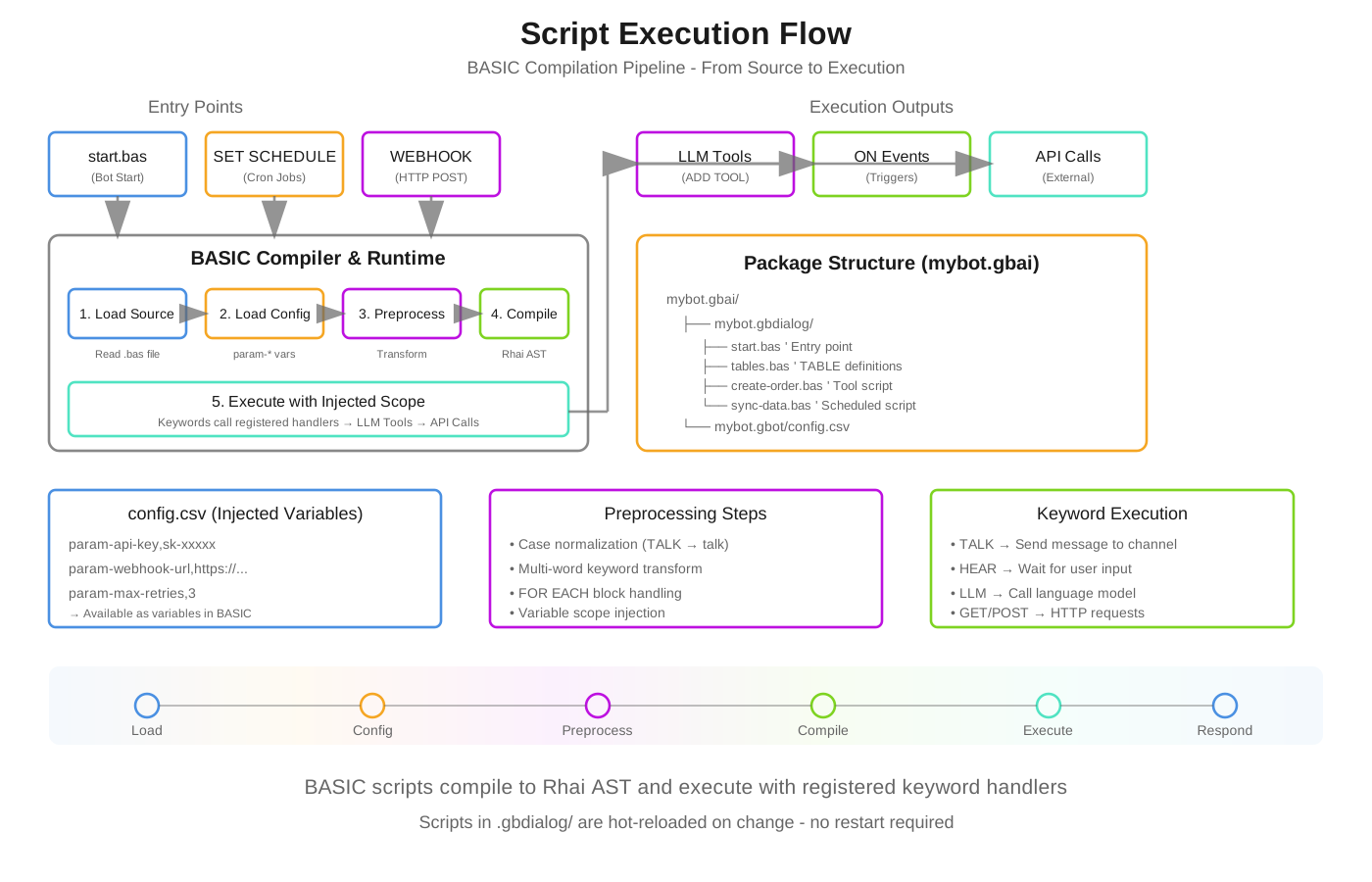
BASIC scripts compile to Rhai AST and execute with registered keyword handlers. Scripts in .gbdialog/ are hot-reloaded on change.
1. Bot Startup (start.bas)
The primary entry point. Executed when a bot initializes or a conversation begins.
' start.bas - Primary entry point
' NO MAIN function needed - execution starts at line 1

' 1. Register tools for LLM to use
ADD TOOL "create-order"
ADD TOOL "track-shipment"
ADD TOOL "customer-lookup"

' 2. Load knowledge bases
USE KB "products"
USE KB "policies"

' 3. Set AI context/personality
BEGIN SYSTEM PROMPT
You are a helpful e-commerce assistant for AcmeStore.
You can help customers with orders, tracking, and product questions.
Always be friendly and professional.
END SYSTEM PROMPT

' 4. Setup UI suggestions
CLEAR SUGGESTIONS
ADD SUGGESTION "New Order"
ADD SUGGESTION "Track Package"
ADD SUGGESTION "Contact Support"

' 5. Welcome message
BEGIN TALK
**Welcome to AcmeStore!** 🛒

I can help you:
• Browse and order products
• Track your shipments
• Answer questions

What would you like to do?
END TALK
2. Scheduled Execution (SET SCHEDULE)
Scripts can run on a cron schedule without user interaction.
' sync-data.bas - Runs automatically on schedule
SET SCHEDULE "0 0 */4 * * *"  ' Every 4 hours

' Variables from config.csv are available
' param-host -> host, param-limit -> limit, param-pages -> pages

SEND EMAIL admin1, "Data sync started..."

page = 1
DO WHILE page > 0 AND page < pages
    res = GET host + "/products?page=" + page + "&limit=" + limit

    IF res.data THEN
        MERGE "products" WITH res.data BY "id"
        page = page + 1
    ELSE
        page = 0
    END IF

    WAIT 0.5  ' Rate limiting
LOOP

SEND EMAIL admin1, "Sync complete! " + REPORT
RESET REPORT
Cron Format: second minute hour day month weekday
| Pattern | Description |
|---|---|
0 0 8 * * * |
Daily at 8:00 AM |
0 30 22 * * * |
Daily at 10:30 PM |
0 0 0 */2 * * |
Every 2 days at midnight |
0 0 * * * * |
Every hour |
0 */15 * * * * |
Every 15 minutes |
3. Webhook Entry (WEBHOOK)
Scripts exposed as HTTP endpoints for external integrations.
' order-webhook.bas - HTTP endpoint
WEBHOOK "order-received"

' Creates: POST /api/bot/{botname}/order-received
' Parameters become variables automatically

' Access webhook parameters
orderId = GET TOOL PARAM "orderId"
customerEmail = GET TOOL PARAM "email"
amount = GET TOOL PARAM "amount"

' Validate (optional)
IF orderId = "" THEN
    RETURN #{ status: 400, error: "Missing orderId" }
END IF

' Process the webhook
order = NEW OBJECT
order.id = orderId
order.email = customerEmail
order.amount = amount
order.status = "received"
order.timestamp = NOW

SAVE "orders", order

' Notify
TALK TO customerEmail, "Order " + orderId + " received! Total: $" + amount

RETURN #{ status: 200, orderId: orderId, message: "Order processed" }
4. LLM Tool Invocation
When registered with ADD TOOL, scripts become callable by the LLM during conversation.
' create-order.bas - Called by LLM when user wants to order
PARAM productId AS STRING LIKE "PROD-001" REQUIRED
PARAM quantity AS NUMBER LIKE 1 REQUIRED
PARAM customerEmail AS STRING LIKE "john@example.com" REQUIRED
DESCRIPTION "Creates a new order for a product"

' This script is invoked by the LLM, not directly by user
' The LLM collects all parameters through natural conversation

product = FIND "products", "id=" + productId

IF ISEMPTY(product) THEN
    RETURN "Product not found: " + productId
END IF

IF product.stock < quantity THEN
    RETURN "Only " + product.stock + " available"
END IF

' Create the order
order = NEW OBJECT
order.id = "ORD-" + FORMAT(NOW, "yyyyMMddHHmmss")
order.productId = productId
order.quantity = quantity
order.total = product.price * quantity
order.customerEmail = customerEmail
order.status = "pending"

SAVE "orders", order

' Update inventory
UPDATE "products", productId, "stock=" + (product.stock - quantity)

RETURN "Order " + order.id + " created! Total: $" + order.total
5. Event Handlers (ON)
React to system events.
' events.bas - Event handlers
ON "message" CALL HandleMessage
ON "user_joined" CALL WelcomeUser
ON "error" CALL LogError

SUB HandleMessage(message)
    ' Process incoming message
    LOG_INFO "Received: " + message.text
END SUB

SUB WelcomeUser(user)
    TALK TO user.email, "Welcome to our service!"
END SUB

SUB LogError(error)
    LOG_ERROR "Error occurred: " + error.message
    SEND EMAIL admin1, "Bot Error: " + error.message
END SUB
Variable Injection from config.csv
Variables defined with param- prefix in config.csv are automatically injected into script scope.
config.csv
name,value

bot-name,Bling Integration
bot-description,ERP synchronization bot

param-host,https://api.bling.com.br/Api/v3
param-limit,100
param-pages,50
param-admin1,admin@company.com
param-admin2,backup@company.com
param-blingClientID,your-client-id
param-blingClientSecret,your-secret
Script Usage
' Variables are available without param- prefix
' All normalized to lowercase for case-insensitivity

result = GET host + "/products?limit=" + limit

DO WHILE page < pages
    ' Use injected variables directly
    data = GET host + "/items?page=" + page
LOOP

' Admin emails for notifications
SEND EMAIL admin1, "Sync complete!"
SEND EMAIL admin2, "Backup notification"
Type Conversion
Values are automatically converted:
- Numbers:
param-limit,100→limitas integer100 - Floats:
param-rate,0.15→rateas float0.15 - Booleans:
param-enabled,true→enabledas booleantrue - Strings: Everything else remains as string
Case Insensitivity
All variables in General Bots BASIC are case-insensitive.
' These all refer to the same variable
host = "https://api.example.com"
result = GET Host + "/endpoint"
TALK HOST
The preprocessor normalizes all variable names to lowercase while preserving:
- Keywords (remain UPPERCASE for clarity)
- String literals (exact content preserved)
- Comments (skipped entirely)
Script Compilation Flow
┌─────────────────────────────────────────────────────────────────┐
│                    COMPILATION PIPELINE                          │
├─────────────────────────────────────────────────────────────────┤
│                                                                 │
│  1. LOAD SOURCE                                                 │
│     └─→ Read .bas file from .gbdialog folder                   │
│                                                                 │
│  2. LOAD CONFIG                                                 │
│     └─→ Read config.csv, extract param-* entries               │
│     └─→ Inject into execution scope                            │
│                                                                 │
│  3. PREPROCESS                                                  │
│     ├─→ Strip comments (REM, ', //)                            │
│     ├─→ Process SWITCH/CASE blocks                             │
│     ├─→ Normalize variables to lowercase                       │
│     ├─→ Transform multi-word keywords                          │
│     └─→ Handle FOR EACH blocks                                 │
│                                                                 │
│  4. COMPILE                                                     │
│     └─→ Parse to Rhai AST                                      │
│                                                                 │
│  5. EXECUTE                                                     │
│     └─→ Run AST with injected scope                            │
│     └─→ Keywords call registered handlers                      │
│                                                                 │
└─────────────────────────────────────────────────────────────────┘
Functions vs Entry Points
NO MAIN Function
Unlike traditional programming, BASIC scripts do NOT use a MAIN function. Execution starts at line 1.
' ❌ WRONG - Don't do this
SUB MAIN()
    TALK "Hello"
END SUB

' ✅ CORRECT - Start directly
TALK "Hello"
SUB and FUNCTION for Reuse
Use SUB and FUNCTION for reusable code within tools, not as entry points.
' sync-products.bas - A complex tool with helper functions

FUNCTION CalculateDiscount(price, percentage)
    RETURN price * (1 - percentage / 100)
END FUNCTION

SUB NotifyAdmin(message)
    SEND EMAIL admin1, message
    LOG_INFO message
END SUB

SUB ProcessProduct(product)
    IF product.discount > 0 THEN
        product.finalPrice = CalculateDiscount(product.price, product.discount)
    ELSE
        product.finalPrice = product.price
    END IF
    SAVE "products", product
END SUB

' Main execution starts here (not in a MAIN sub)
products = GET host + "/products"

FOR EACH product IN products.data
    CALL ProcessProduct(product)
NEXT product

CALL NotifyAdmin("Processed " + COUNT(products.data) + " products")
Tool Chain Pattern
Register tools in start.bas, implement in separate files:
start.bas
' Register tools - LLM can call these
ADD TOOL "create-customer"
ADD TOOL "update-customer"
ADD TOOL "delete-customer"

' Or clear and re-register
CLEAR TOOLS
ADD TOOL "order-management"
ADD TOOL "inventory-check"
create-customer.bas
PARAM name AS STRING LIKE "John Doe" REQUIRED
PARAM email AS STRING LIKE "john@example.com" REQUIRED
PARAM phone AS STRING LIKE "+1-555-0123"
DESCRIPTION "Creates a new customer record in the CRM"

' Tool implementation
customer = NEW OBJECT
customer.id = "CUS-" + FORMAT(NOW, "yyyyMMddHHmmss")
customer.name = name
customer.email = email
customer.phone = phone
customer.createdAt = NOW

SAVE "customers", customer

RETURN #{
    success: true,
    customerId: customer.id,
    message: "Customer created successfully"
}
Best Practices
1. Organize by Purpose
mybot.gbai/
├── mybot.gbdialog/
│   ├── start.bas           ' Entry point, tool registration
│   ├── tables.bas          ' Database schema (TABLE definitions)
│   │
│   ├── create-order.bas    ' Tool: order creation
│   ├── track-order.bas     ' Tool: order tracking
│   ├── cancel-order.bas    ' Tool: order cancellation
│   │
│   ├── sync-products.bas   ' Scheduled: product sync
│   ├── sync-inventory.bas  ' Scheduled: inventory sync
│   │
│   └── order-webhook.bas   ' Webhook: external orders
│
├── mybot.gbot/
│   └── config.csv          ' Configuration & param-* variables
│
└── mybot.gbkb/             ' Knowledge base files
2. Use param-* for Configuration
Keep credentials and settings in config.csv, not hardcoded:
' ❌ WRONG
host = "https://api.bling.com.br/Api/v3"
apiKey = "hardcoded-key"

' ✅ CORRECT - From config.csv
' param-host and param-apiKey in config.csv
result = GET host + "/endpoint"
SET HEADER "Authorization", "Bearer " + apikey
3. Error Handling in Tools
PARAM orderId AS STRING REQUIRED
DESCRIPTION "Cancels an order"

order = FIND "orders", "id=" + orderId

IF ISEMPTY(order) THEN
    RETURN #{ success: false, error: "Order not found" }
END IF

IF order.status = "shipped" THEN
    RETURN #{ success: false, error: "Cannot cancel shipped orders" }
END IF

UPDATE "orders", orderId, "status=cancelled"

RETURN #{ success: true, message: "Order cancelled" }
4. Logging for Scheduled Jobs
SET SCHEDULE "0 0 6 * * *"

LOG_INFO "Daily sync started"

' ... sync logic ...

IF errorCount > 0 THEN
    LOG_WARN "Sync completed with " + errorCount + " errors"
    SEND EMAIL admin1, "Sync Warning", REPORT
ELSE
    LOG_INFO "Sync completed successfully"
END IF

RESET REPORT
See Also
- Keyword Reference - Complete keyword documentation
- SET SCHEDULE - Scheduling details
- WEBHOOK - Webhook configuration
- Tools System - Tool registration
- BEGIN SYSTEM PROMPT - AI context configuration