 Rodrigo Rodriguez (Pragmatismo)
9d25ecbb12
Rodrigo Rodriguez (Pragmatismo)
9d25ecbb12
- Add autotask-architecture.svg showing intent classification flow
- Convert all designer-panel format to wa-chat (WhatsApp style)
- Remove emojis and icons per PROMPT.md standards
- Convert ASCII diagrams to tables
- Delete CODER-PROMPT.md and implementation.md
- Rename chapter from 21 to 17
- Add 6 SVG diagrams for chapter 17
- Fix book.toml: devchat-panel.css to designer-panel.css
- Update SUMMARY.md with correct paths
4.5 KiB
Autonomous Tasks
Build complete applications through natural conversation. Describe what you want, and the system creates it automatically.
The AutoTask system uses an LLM-powered intent classifier to understand your request and route it to the appropriate handler. Whether you need a full web application, a simple reminder, or automated monitoring, you describe it in plain language.
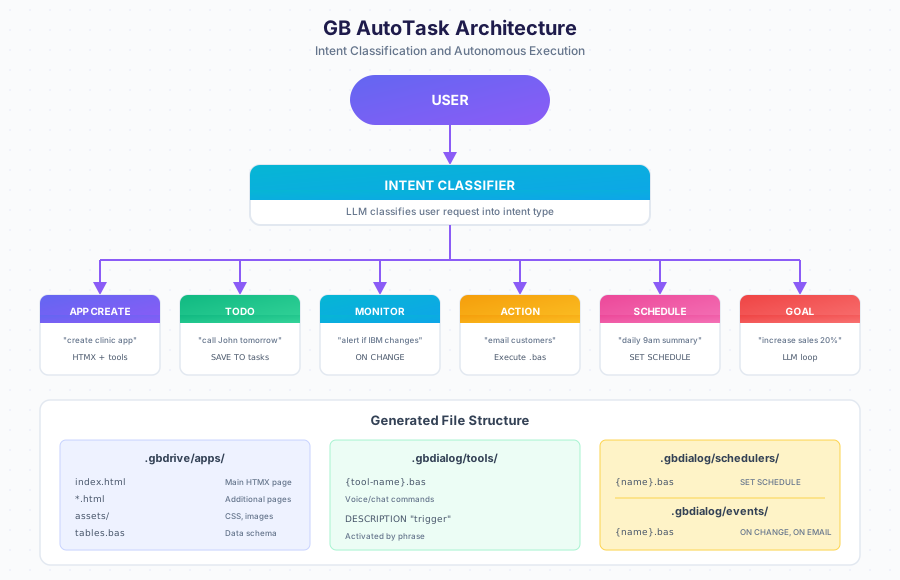
Intent Types
| Type | Example | What Gets Created |
|---|---|---|
APP_CREATE |
"create app for clinic" | HTMX pages, tools, schedulers |
TODO |
"call John tomorrow" | Task saved to tasks table |
MONITOR |
"alert when IBM changes" | ON CHANGE event handler |
ACTION |
"email all customers" | Executes immediately |
SCHEDULE |
"daily 9am summary" | SET SCHEDULE automation |
GOAL |
"increase sales 20%" | Autonomous LLM loop with metrics |
TOOL |
"when I say X, do Y" | Voice/chat command |
Quick Start
Create an app for my clinic
Done:
patients table created
appointments table created
App available at /apps/clinic
Architecture Overview
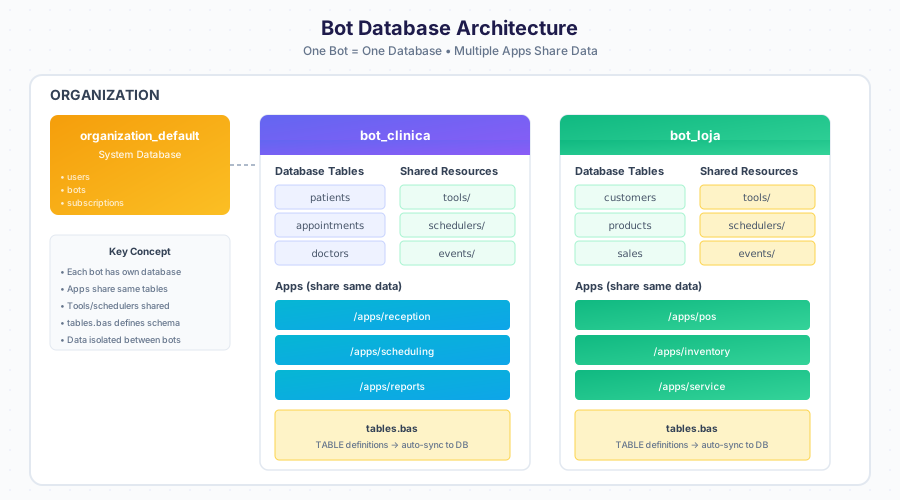
One bot equals one database. All applications within a bot share the same data tables, tools, and schedulers.
File Structure
| Path | Description |
|---|---|
.gbdrive/apps/{name}/ |
Generated web application |
.gbdrive/apps/{name}/index.html |
Main HTMX page |
.gbdrive/apps/{name}/assets/ |
CSS, images |
.gbdialog/tables.bas |
Database schema definitions |
.gbdialog/tools/ |
Voice and chat commands |
.gbdialog/schedulers/ |
Timed automations |
.gbdialog/events/ |
Event triggers (ON CHANGE, ON EMAIL) |
Creating an Application
I need an app to track customers and orders
Done:
customers table created
orders table created
App available at /apps/store
Modifying Your Application
Use Designer to change anything about your app through conversation.
Add a phone field to customers
Phone field added to customers table.
Change the submit button to blue
Button color updated to blue.
Adding Automation
Every day at 9am, send me new orders by email
Scheduler created: daily-orders-summary.bas
Schedule: Every day at 9:00 AM
Keywords Reference
| Keyword | Purpose |
|---|---|
TABLE |
Define data structure |
FIND |
Search records |
SAVE |
Create record |
UPDATE |
Modify record |
DELETE |
Remove record |
TALK |
Send message |
HEAR |
Wait for input |
SET SCHEDULE |
Create automation |
ON CHANGE |
Monitor for changes |
ON EMAIL |
Trigger on email received |
Next Steps
- Designer Guide — Edit apps through conversation
- Data Model — Understanding tables
- Task Workflow — How tasks execute
- Examples — Real-world applications