
7.8 KiB
Quick Start
Installation in 3 Steps
1. Run BotServer
./botserver
That's it! No configuration needed.
2. Wait for Bootstrap (2-5 minutes)
You'll see:
🚀 BotServer starting...
📦 Bootstrap: Detecting system...
📦 Installing PostgreSQL...
   ✓ Database created
   ✓ Schema initialized
   ✓ Credentials saved to .env
📦 Installing Drive...
   ✓ Object storage ready
   ✓ Buckets created
📦 Installing Valkey...
   ✓ Cache server running
🤖 Creating bots from templates...
   ✓ default.gbai → Default bot
   ✓ announcements.gbai → Announcements bot
✅ BotServer ready at http://localhost:8080
3. Open Browser
http://localhost:8080
Start chatting with your bot!
What Just Happened?
Bootstrap Flow
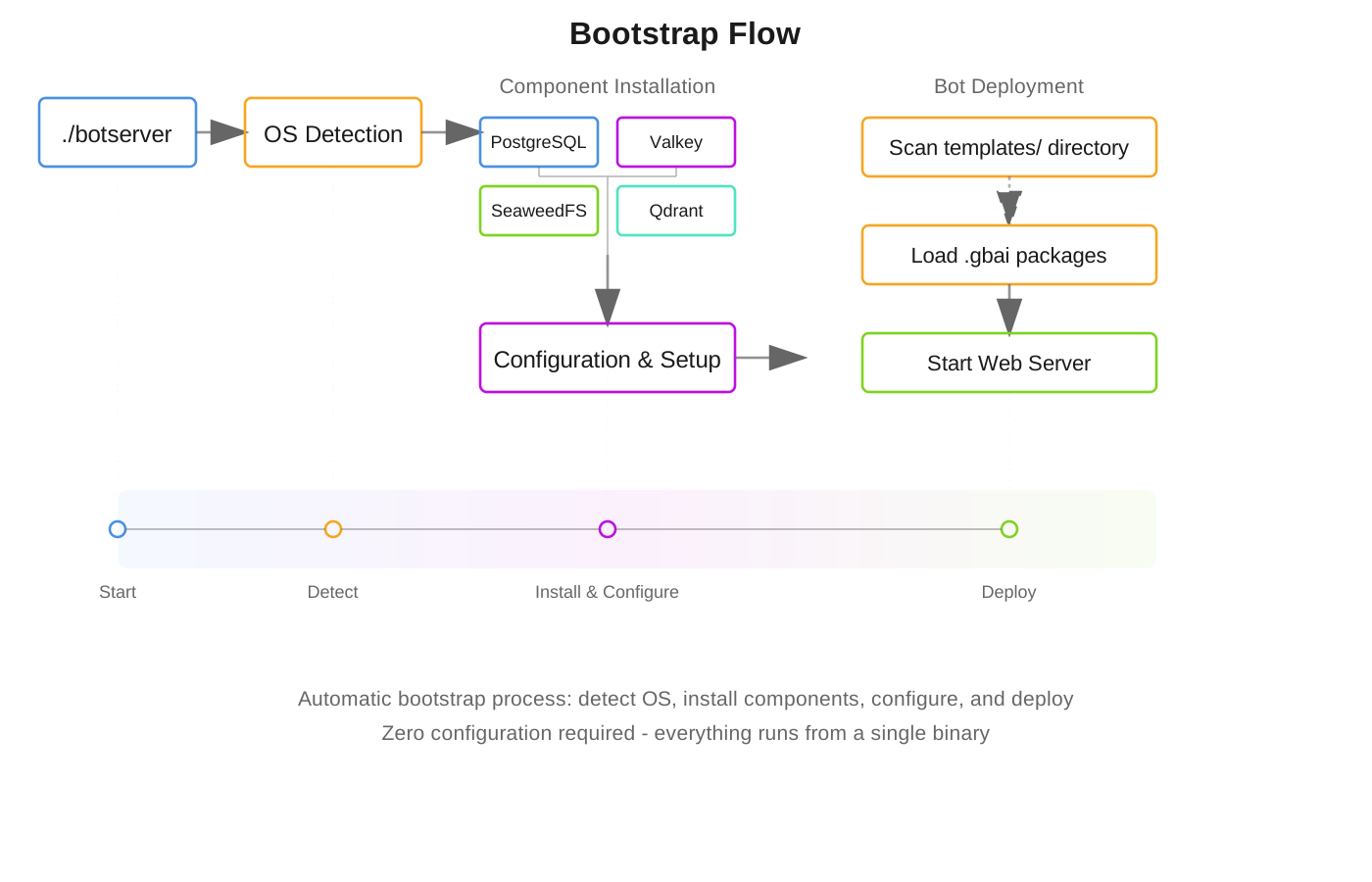
The automatic bootstrap process:
- ✅ Detected your OS (Linux/macOS/Windows)
- ✅ Downloaded PostgreSQL database to botserver-stack/
- ✅ Downloaded drive (S3-compatible storage) to botserver-stack/
- ✅ Downloaded Valkey cache to botserver-stack/
- ✅ Generated secure credentials →
.env(from blank environment) - ✅ Created database schema
- ✅ Deployed default bots to object storage
- ✅ Started UI server on port 8080
Zero manual configuration required!
Using Existing Services
If you already have PostgreSQL or drive storage running, update .env:
# Point to your existing services
DATABASE_URL=postgres://myuser:mypass@myhost:5432/mydb
DRIVE_SERVER=http://my-drive:9000
DRIVE_ACCESSKEY=my-access-key
DRIVE_SECRET=my-secret-key
Step 2: Write a Simple Tool
How Tools Work

Tools are just .bas files. Create enrollment.bas:
' Student enrollment tool
PARAM name, email, course
DESCRIPTION "Processes student enrollment"

SAVE "enrollments.csv", name, email, course, NOW()
TALK "Welcome to " + course + ", " + name + "!"
The LLM automatically discovers this tool and knows when to call it!
Step 3: Add Knowledge Base
Drop documents in a .gbkb/ folder:
mybot.gbai/
  mybot.gbkb/
    docs/
      manual.pdf
      faq.docx
      guide.txt
The bot automatically:
- Indexes documents with vector embeddings
- Answers questions from the content
- Updates when files change
Container Deployment (LXC)
For production isolation, BotServer supports LXC (Linux Containers):
# Create container
lxc-create -n botserver -t download -- -d ubuntu -r jammy -a amd64

# Start and attach
lxc-start -n botserver
lxc-attach -n botserver

# Install BotServer inside container
./botserver
Benefits:
- ✅ Process isolation
- ✅ Resource control
- ✅ Easy management
- ✅ Lightweight virtualization
Optional Components
After installation, add more features:
./botserver install email      # Email server
./botserver install directory  # Identity provider
./botserver install llm        # Local LLM server (offline mode)
./botserver install meeting    # Video conferencing
Example Bot Structure
mybot.gbai/
  mybot.gbdialog/          # Dialog scripts
    start.bas            # Entry point (required)
    get-weather.bas      # Tool (auto-discovered)
    send-email.bas       # Tool (auto-discovered)
  mybot.gbkb/              # Knowledge base
    docs/                # Document collection
    faq/                 # FAQ collection
  mybot.gbot/              # Configuration
    config.csv           # Bot parameters
  mybot.gbtheme/           # UI theme (optional)
    custom.css
Deploy new bots by uploading to object storage (creates a new bucket), not the local filesystem. The work/ folder is for internal use only.
Local Development with Auto-Sync
Edit bot files locally and sync automatically to drive storage:
Free S3 Sync Tools:
- Cyberduck - GUI file browser (Windows/Mac/Linux)
- rclone - Command-line sync (All platforms)
- WinSCP - File manager with S3 (Windows)
- S3 Browser - Freeware S3 client (Windows)
Quick Setup with rclone:
# Configure for drive storage
rclone config  # Follow prompts for S3-compatible storage

# Auto-sync local edits to bucket
rclone sync ./mybot.gbai drive:mybot --watch
Now when you:
- Edit
.csv→ Bot config reloads automatically - Edit
.bas→ Scripts compile automatically - Add docs to
.gbkb/→ Knowledge base updates
How It Really Works
You DON'T write complex dialog flows. Instead:
1. Add Documents
mybot.gbkb/
  policies/enrollment-policy.pdf
  catalog/courses.pdf
2. Create Tools (Optional)
' enrollment.bas - just define what it does
PARAM name AS string
PARAM course AS string
SAVE "enrollments.csv", name, course
3. Start Chatting!
User: I want to enroll in computer science
Bot: I'll help you enroll! What's your name?
User: John Smith
Bot: [Automatically calls enrollment.bas with collected params]
     Welcome to Computer Science, John Smith!
The LLM handles ALL conversation logic automatically!
Configuration (Optional)
Bootstrap automatically generates .env from a blank environment with secure random credentials:
# Auto-generated during bootstrap
DATABASE_URL=postgres://gbuser:RANDOM_PASS@localhost:5432/botserver
DRIVE_SERVER=http://localhost:9000
DRIVE_ACCESSKEY=GENERATED_KEY
DRIVE_SECRET=GENERATED_SECRET
You can also configure per-bot settings in config.csv:
name,value
server_port,8080
llm-url,http://localhost:8081
prompt-compact,4
theme-color1,#0d2b55
Troubleshooting
Port 8080 in use?
Edit templates/default.gbai/default.gbot/config.csv:
name,value
server_port,3000
Clean install?
# Remove everything and start fresh
rm -rf botserver-stack/
rm .env
./botserver  # Will regenerate everything
Check component status
./botserver status tables    # PostgreSQL
./botserver status drive     # Drive storage
./botserver status cache     # Valkey cache
Documentation
- Full Installation Guide - Detailed bootstrap explanation
- Tool Definition - Creating tools
- BASIC Keywords - Language reference
- Package System - Creating bots
- Architecture - How it works
The Magic Formula
📚 Documents + 🔧 Tools + 🤖 LLM = ✨ Intelligent Bot
What You DON'T Need:
- ❌ IF/THEN logic
- ❌ Intent detection
- ❌ Dialog flow charts
- ❌ State machines
- ❌ Complex routing
What You DO:
- ✅ Drop documents in
.gbkb/ - ✅ Create simple
.bastools (optional) - ✅ Start chatting!
The LLM understands context, calls tools, searches documents, and maintains conversation naturally.
Philosophy
- Just Run It - No manual configuration
- Simple Scripts - BASIC-like language anyone can learn
- Automatic Discovery - Tools and KBs auto-detected
- Secure by Default - Credentials auto-generated
- Production Ready - Built for real-world use
Real Example: Education Bot
-
Add course materials:
edu.gbkb/ courses/computer-science.pdf policies/enrollment.pdf -
Create enrollment tool:
' enrollment.bas PARAM name AS string PARAM course AS string SAVE "enrollments.csv", name, course -
Just chat:
User: What courses do you offer?
Bot: [Searches PDFs] We offer Computer Science, Data Science...

User: I want to enroll
Bot: [Calls enrollment.bas] Let me help you enroll...
No programming logic needed - the LLM handles everything! 🎉