
3.7 KiB
Semantic Search
Semantic search in BotServer happens automatically when you use USE KB. The system searches for relevant information based on meaning, not just keywords, and makes it available to the system AI during conversations.
Search Pipeline
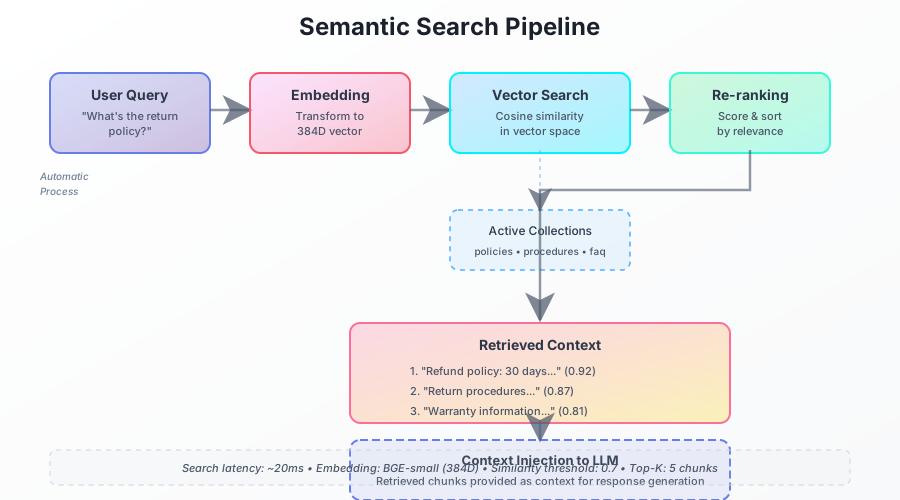
How It Works Automatically
- User asks a question - Natural language input
- Query converted to vector - Using the embedding model
- Search active collections - Finds semantically similar content
- Inject into context - Relevant chunks provided to system AI
- Generate response - System AI answers using the knowledge
Activating Semantic Search
Simply use USE KB to enable search for a collection:
USE KB "policies"
USE KB "procedures"
' Both collections are now searchable
' No explicit search commands needed
When users ask questions, the system automatically searches these collections and provides relevant context to the system AI.
How Meaning-Based Search Works
Unlike keyword search, semantic search understands meaning:
- "How many days off do I get?" matches "vacation policy"
- "What's the return policy?" matches "refund procedures"
- "I'm feeling sick" matches "medical leave guidelines"
The system uses vector embeddings to find conceptually similar content, even when exact words don't match.
Configuration
Search behavior is controlled by config.csv:
prompt-history,2     # How many previous messages to include
prompt-compact,4     # Compact context after N exchanges
These settings manage how much context the system AI receives, not the search itself.
Multiple Collections
When multiple collections are active, the system searches all of them:
USE KB "products"
USE KB "support"
USE KB "warranty"

' User: "My laptop won't turn on"
' System searches all three collections for relevant info
Search Quality
The quality of semantic search depends on:
- Document organization - Well-structured folders help
- Embedding model - BGE model works well, can be replaced
- Content quality - Clear, descriptive documents work best
Real Example
' In start.bas
USE KB "company-handbook"

' User types: "What's the dress code?"
' System automatically:
' 1. Searches company-handbook for dress code info
' 2. Finds relevant sections about attire
' 3. Injects them into LLM context
' 4. LLM generates natural response with the information
Performance
- Search happens in milliseconds
- No configuration needed
- Cached for repeated queries
- Only active collections are searched
Best Practices
- Activate only needed collections - Don't overload context
- Organize content well - One topic per folder
- Use descriptive text - Helps with matching
- Keep documents updated - Fresh content = better answers
Common Misconceptions
❌ Wrong: You need to call a search function
✅ Right: Search happens automatically with USE KB
❌ Wrong: You need to configure search parameters ✅ Right: It works out of the box
❌ Wrong: You need special commands to query ✅ Right: Users just ask questions naturally
Troubleshooting
Not finding relevant content?
- Check the collection is activated with
USE KB - Verify documents are in the right folder
- Ensure content is descriptive
Too much irrelevant content?
- Use fewer collections simultaneously
- Organize documents into more specific folders
- Clear unused collections with
CLEAR KB
Remember: The beauty of semantic search in BotServer is its simplicity - just USE KB and let the system handle the rest!