 Rodrigo Rodriguez (Pragmatismo)
dd59e923f4
Rodrigo Rodriguez (Pragmatismo)
dd59e923f4
- Add mdBook configuration (book.toml) for documentation
- Create new docs style guide appendix for conversation examples
- Add WhatsApp-style chat CSS for consistent doc formatting
- Replace flow diagram references with screen mockup SVGs
- Create comprehensive SVG interface mockups for all Suite apps:
  - Main suite layout and individual app screens
  - Analytics, Calendar, Chat, Compliance, Designer
  - Drive, Mail, Meet, Paper, Player, Research
  - Sources, Tasks interfaces
- Implement certificate pinning module (cert_pinning.rs) with:
  - SPKI fingerprint validation using SHA-256
  - Support for primary and backup pins
  - Pin rotation with expiration tracking
  - Report-only mode for testing
  - Validation caching for performance
- Add ring crate dependency for cryptographic operations
4.5 KiB
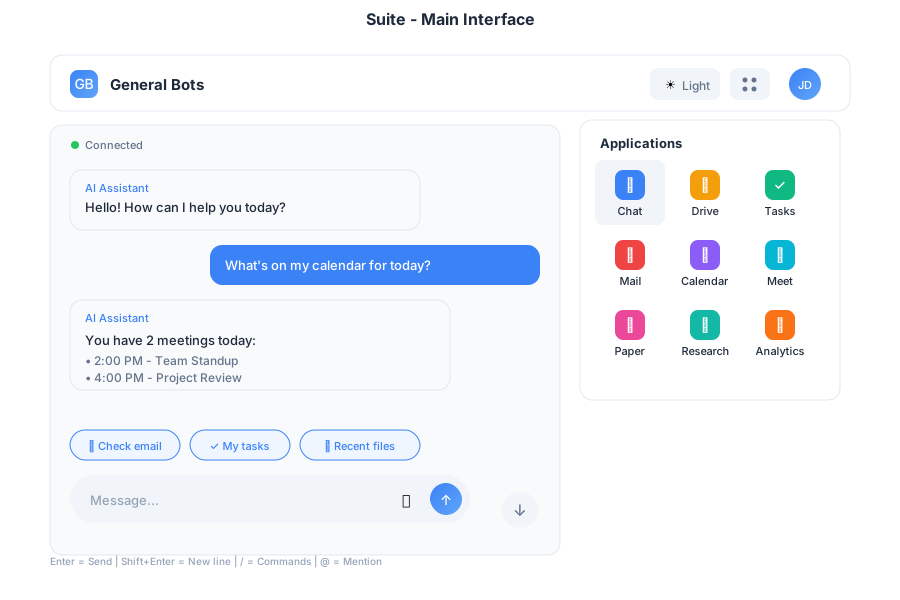
Suite - Full Desktop Interface
Complete productivity suite with integrated applications
Overview
The Suite provides a complete desktop interface with multiple integrated applications for web, desktop, and mobile platforms. It serves as the primary interface for General Bots, combining AI-powered chat with productivity tools.
Features
Multi-Application Layout
The Suite includes integrated applications:
| App | Purpose |
|---|---|
| 💬 Chat | AI assistant conversations |
| 📁 Drive | File management |
| ✓ Tasks | To-do lists |
| Email client | |
| 📅 Calendar | Scheduling |
| 🎥 Meet | Video calls |
| 🎬 Player | Media viewer |
| 📝 Paper | AI writing |
| 🔍 Research | AI search |
| 📊 Analytics | Dashboards |
Responsive Design
The Suite adapts to any screen size:
- Desktop (>1024px): Full multi-panel layout with persistent navigation
- Tablet (768-1024px): Collapsible sidebar with touch-optimized controls
- Mobile (<768px): Single column with bottom navigation and swipe gestures
Theme Support
- Light and dark mode
- Custom color schemes via
.gbtheme - Automatic system preference detection
Navigation
Header Bar
The header provides quick access to:
- Logo and branding
- App selector grid
- Theme switcher
- User menu and settings
App Launcher
Click the grid icon (⋮⋮⋮) to access all applications in a dropdown menu.
Keyboard Shortcuts
| Shortcut | Action |
|---|---|
Alt+1 |
Chat |
Alt+2 |
Drive |
Alt+3 |
Tasks |
Alt+4 |
|
Alt+5 |
Calendar |
Alt+6 |
Meet |
Esc |
Close menus |
Usage
As Desktop App
Used automatically when running with --desktop:
./botserver --desktop
# Opens Suite in native window
As Web Interface
Default template for browser access:
./botserver
# Browse to http://localhost:8080
# Loads Suite interface
As Mobile PWA
Install as Progressive Web App:
- Open in mobile browser
- Add to home screen
- Launches as standalone app
Example Workflows
Quick Task Creation
Create a task to review the quarterly report by Friday
✅ Task created:
📋 Review quarterly report
📅 Due: Friday
View in Tasks app?
File Sharing
Share the project proposal with the team
📎 project-proposal.pdf
Shared with: Team Members
Link: https://...
Meeting Scheduling
Schedule a meeting with Sarah tomorrow at 2pm
📅 Meeting scheduled:
👤 With: Sarah
🕐 Tomorrow at 2:00 PM
📍 Video call link generated
Invitation sent!
Performance
| Metric | Target |
|---|---|
| Initial Load | < 200KB |
| WebSocket Latency | < 50ms |
| Touch Response | 60fps animations |
| Offline Support | Service worker caching |
Browser Support
- Chrome/Edge 90+
- Firefox 88+
- Safari 14+
- Mobile browsers (iOS Safari, Chrome Mobile)
Configuration
Customize Suite behavior in config.csv:
key,value
theme-color1,#0d2b55
theme-color2,#e3f2fd
theme-title,My Company Suite
theme-logo,https://example.com/logo.svg
suite-default-app,chat
suite-sidebar-collapsed,false
See Also
- Chat App - AI assistant
- Drive App - File management
- Tasks App - Task management
- HTMX Architecture - Technical details
- Theme Customization - Styling