
6.1 KiB
.gbai Architecture
A bot is just a folder. The .gbai extension marks a directory as a BotServer package containing everything needed to run a conversational AI bot - scripts, documents, configuration, and themes.
The Dead Simple Structure
my-bot.gbai/                    # This folder = your entire bot
  my-bot.gbdialog/           # BASIC conversation scripts
  my-bot.gbkb/               # Documents for Q&A
  my-bot.gbot/               # Configuration
  my-bot.gbtheme/            # Optional UI customization
That's it. No manifests, no build files, no dependencies. Copy the folder to deploy.
Visual Architecture
Architecture
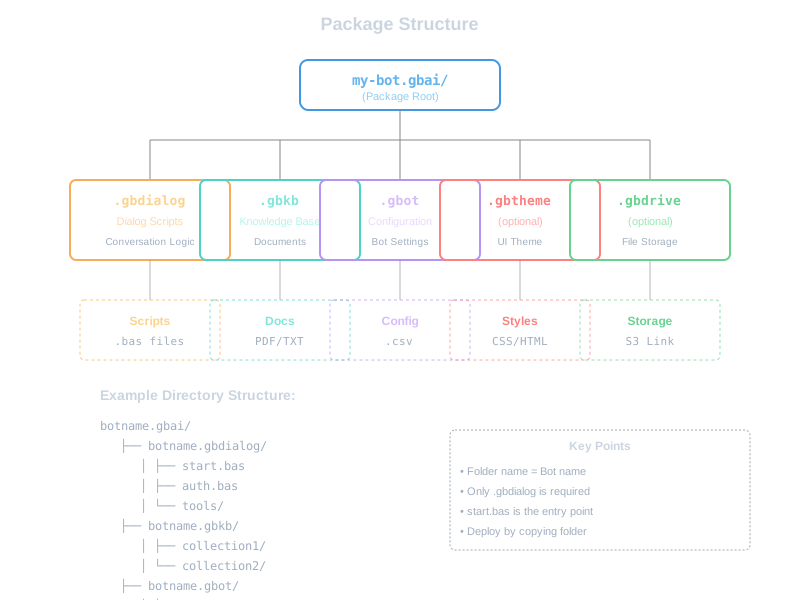
How Bootstrap Finds Bots
At startup, BotServer scans templates/ for any folder ending in .gbai:
templates/
  default.gbai/       → Creates bot at /default
  support.gbai/       → Creates bot at /support
  sales.gbai/         → Creates bot at /sales
Each .gbai becomes a URL endpoint automatically. Zero configuration.
What Goes Where
.gbdialog/ - Your Bot's Brain
BASIC scripts that control conversation flow:
my-bot.gbdialog/
  start.bas           # Runs when session starts
  auth.bas            # Login flow
  tools/              # Callable functions
    book-meeting.bas
    check-status.bas
  handlers/           # Event responses
    on-email.bas
Example start.bas:
TALK "Hi! I'm your assistant."
answer = HEAR
TALK "I can help you with: " + answer
.gbkb/ - Your Bot's Knowledge
Documents organized by topic:
my-bot.gbkb/
  policies/           # HR documents
    vacation.pdf
    handbook.docx
  products/           # Product info
    catalog.pdf
    pricing.xlsx
  support/            # Help docs
    faq.md
Each folder becomes a searchable collection. Drop files in, bot learns automatically.
.gbot/ - Your Bot's Settings
Single config.csv file with key-value pairs:
llm-model,gpt-3.5-turbo
temperature,0.7
max-tokens,2000
welcome-message,Hello! How can I help?
session-timeout,1800
No complex JSON or YAML. Just simple CSV that opens in Excel.
.gbtheme/ - Your Bot's Look (Optional)
Custom web interface styling:
my-bot.gbtheme/
  styles.css          # Custom CSS
  logo.png           # Brand assets
  templates/         # HTML overrides
    chat.html
If missing, uses default theme. Most bots don't need this.
Real Example: Support Bot
Here's a complete customer support bot:
support.gbai/
  support.gbdialog/
    start.bas
    tools/
      create-ticket.bas
      check-status.bas
  support.gbkb/
    faqs/
      common-questions.pdf
    guides/
      troubleshooting.docx
  support.gbot/
    config.csv
start.bas:
USE KB "faqs"
USE KB "guides"
USE TOOL "create-ticket"
USE TOOL "check-status"

TALK "Support bot ready. How can I help?"
create-ticket.bas:
PARAM issue, priority
DESCRIPTION "Creates support ticket"

ticket_id = GENERATE_ID()
SAVE "tickets.csv", ticket_id, issue, priority, NOW()
TALK "Ticket #" + ticket_id + " created"
config.csv:
llm-model,gpt-3.5-turbo
bot-name,TechSupport
greeting,Welcome to support!
Deployment = Copy Folder
Local Development
cp -r my-bot.gbai/ templates/
./botserver restart
# Visit http://localhost:8080/my-bot
Production Server
scp -r my-bot.gbai/ server:~/botserver/templates/
ssh server "cd botserver && ./botserver restart"
Deployment
LXC Container
lxc file push my-bot.gbai/ container/app/templates/
No build step. No compilation. Just copy files.
Multi-Bot Hosting
One BotServer runs multiple bots:
templates/
  support.gbai/       # support.example.com
  sales.gbai/         # sales.example.com
  internal.gbai/      # internal.example.com
  public.gbai/        # www.example.com
Each bot:
- Gets own URL endpoint
- Has isolated sessions
- Runs independently
- Shares infrastructure
Template Inheritance
Bots can share common resources:
templates/
  _shared/
    knowledge/      # Shared documents
    tools/          # Shared functions
  bot1.gbai/
    bot1.gbot/
      config.csv  # includes: _shared
  bot2.gbai/
    bot2.gbot/
      config.csv  # includes: _shared
Naming Conventions
Required
- Folder must end with
.gbai - Subfolders must match:
botname.gbdialog,botname.gbkb, etc. - Main script must be
start.bas
Recommended
- Use lowercase with hyphens:
customer-service.gbai - Group related bots:
support-tier1.gbai,support-tier2.gbai - Version in folder name if needed:
chatbot-v2.gbai
Bootstrap Process
When BotServer starts:

Takes about 5-10 seconds per bot.
Hot Reload
Change files while running:
# Edit script
vim templates/my-bot.gbai/my-bot.gbdialog/start.bas

# Reload just that bot
curl http://localhost:8080/api/admin/reload/my-bot

# Or restart everything
./botserver restart
Package Size Limits
Default limits (configurable):
- Total package: 100MB
- Single document: 10MB
- Number of files: 1000
- Script size: 1MB
- Collection count: 50
Troubleshooting
Bot not appearing?
- Check folder ends with
.gbai - Verify subfolders match bot name
- Look for
start.basin.gbdialog/
Documents not searchable?
- Ensure files are in
.gbkb/subfolder - Check file format is supported
- Wait 30 seconds for indexing
Scripts not running?
- Validate BASIC syntax
- Check file has
.basextension - Review logs for errors
Best Practices
Do's
✅ Keep packages under 50MB
✅ Organize knowledge by topic
✅ Use clear folder names
✅ Test locally first
Don'ts
❌ Don't nest .gbai folders
❌ Don't mix test/prod in same folder
❌ Don't hardcode absolute paths
❌ Don't store secrets in scripts
Summary
The .gbai architecture keeps bot development simple. No complex frameworks, no build systems, no deployment pipelines. Just organize your files in folders, and BotServer handles the rest. Focus on content and conversation, not configuration.
Next: Learn about .gbdialog Dialogs for writing conversation scripts.