 Rodrigo Rodriguez (Pragmatismo)
49eb6696ea
Rodrigo Rodriguez (Pragmatismo)
49eb6696ea
Chapter renames:
- chapter-09-api -> chapter-09-tools (LLM Tools)
- chapter-10-api -> chapter-10-rest (REST Endpoints)

New documentation:
- chapter-04-gbui/admin-user-views.md: Complete guide to User vs Admin interfaces
  - User Settings (/api/user/*): profile, security, notifications, storage
  - Admin Panel (/api/admin/*): users, groups, bots, DNS, audit
  - Permission levels: guest, user, manager, admin
  - Desktop sync considerations

Updated:
- Drive app docs with sync feature (rclone, desktop-only)
- All cross-references to renamed chapters
- SUMMARY.md with new structure and admin-user-views entry
5.2 KiB
Tasks - To-Do Management
Track what needs to be done
Overview
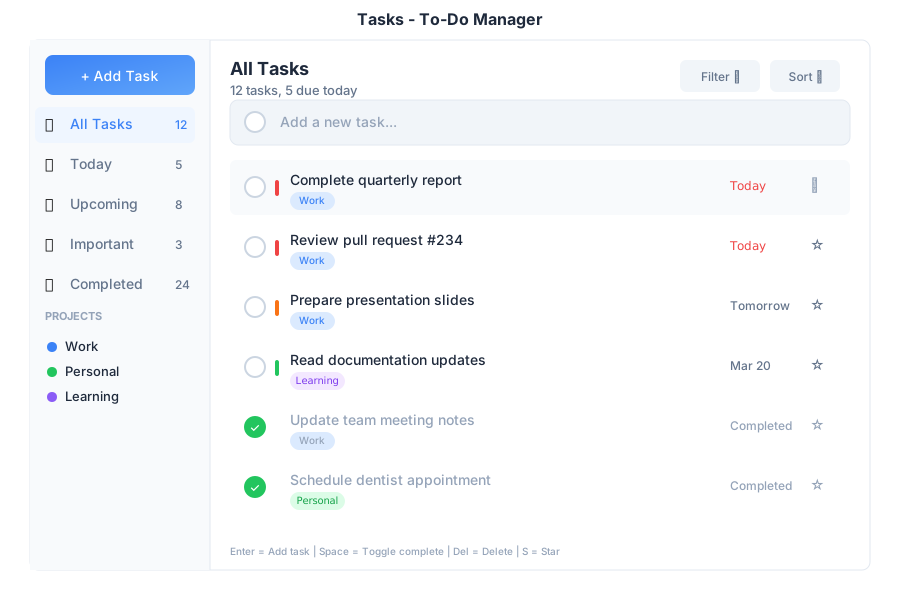
Tasks is your to-do list manager within General Bots Suite. Create tasks, set priorities, organize by category, and track your progress. Built with HTMX for instant updates without page reloads.
Features
Adding Tasks
Quick Add:
- Type task description in the input box
- Press Enter or click + Add
With Details:
- Type task description
- Select a category (optional)
- Pick a due date (optional)
- Click + Add
Priority Levels
| Priority | Icon | When to Use |
|---|---|---|
| High | 🔴 | Must do today |
| Medium | 🟡 | Important but not urgent |
| Low | 🟢 | Can wait |
| None | ⚪ | No deadline |
Categories
| Category | Icon |
|---|---|
| Work | 💼 |
| Personal | 🏠 |
| Shopping | 🛒 |
| Health | ❤️ |
| Custom | 🏷️ |
Filter Tabs
| Tab | Shows |
|---|---|
| All | All tasks |
| Active | Uncompleted tasks |
| Completed | Done tasks |
| Priority | High priority only |
Keyboard Shortcuts
| Shortcut | Action |
|---|---|
Enter |
Add task (when in input) |
Space |
Toggle task completion |
Delete |
Remove selected task |
Tab |
Move to next field |
Escape |
Cancel editing |
↑ / ↓ |
Navigate tasks |
Creating Tasks from Chat
Create a task to review the budget by Friday
✅ Task created:
📋 Review the budget
📅 Due: Friday, March 22
🏷️ Category: Work
Managing Tasks via Chat
What tasks do I have today?
📋 Today's Tasks (3 active):
🔴 Review quarterly report
🟡 Call client about proposal
🟢 Update project documentation
Mark the quarterly report as done
✅ Task completed:
📋 Review quarterly report
You have 2 tasks remaining today.
Setting Reminders
Remind me to call John tomorrow at 3pm
✅ Task created with reminder:
📋 Call John
📅 Tomorrow at 3:00 PM
🔔 Reminder set for 2:55 PM
API Endpoints
| Endpoint | Method | Description |
|---|---|---|
/api/tasks |
GET | List all tasks |
/api/tasks |
POST | Create new task |
/api/tasks/:id |
GET | Get single task |
/api/tasks/:id |
PATCH | Update task |
/api/tasks/:id |
DELETE | Delete task |
/api/tasks/stats |
GET | Get task statistics |
Query Parameters
| Parameter | Values | Default |
|---|---|---|
filter |
all, active, completed, priority |
all |
category |
work, personal, shopping, health |
none |
sort |
created, dueDate, priority, text |
created |
order |
asc, desc |
desc |
Request Body (Create/Update)
{
    "text": "Review quarterly report",
    "category": "work",
    "dueDate": "2024-03-20",
    "priority": "high",
    "completed": false
}
Response Format
{
    "id": 123,
    "text": "Review quarterly report",
    "category": "work",
    "dueDate": "2024-03-20",
    "priority": "high",
    "completed": false,
    "createdAt": "2024-03-18T10:30:00Z",
    "updatedAt": "2024-03-18T10:30:00Z"
}
Integration with Calendar
Tasks with due dates automatically appear in your Calendar view, helping you visualize your workload across days and weeks.
Troubleshooting
Tasks Not Saving
- Check network connection
- Verify API endpoint is accessible
- Check browser console for errors
- Try refreshing the page
Filters Not Working
- Click the filter tab again
- Check if tasks exist for that filter
- Clear browser cache
Stats Not Updating
- Reload the page
- Check for JavaScript errors in console
See Also
- Suite Manual - Complete user guide
- Chat App - Create tasks from chat
- Calendar App - View tasks in calendar
- Tasks API - API reference