
10 KiB
Tasks - Autonomous App Builder
Describe what you want, get a working application
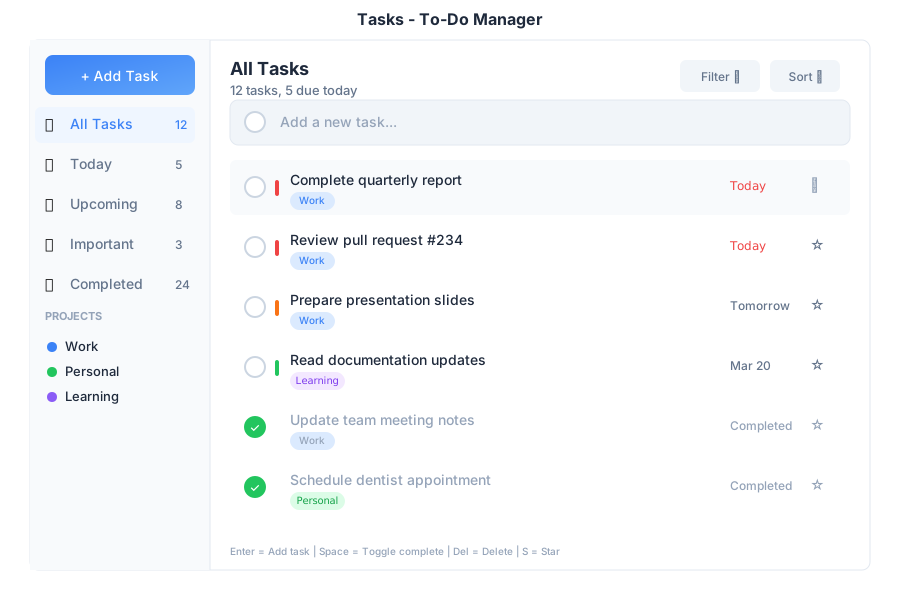
Overview
Tasks is the command center for autonomous application creation in General Bots Suite. Instead of coding, you describe what you need in plain language, and the system builds complete, working applications with databases, UI, and automation.
This is not a simple to-do list—it's an AI-powered development environment that understands intent and executes multi-step plans to create real applications.
Features
Natural Language App Creation
Describe your application in plain English:
Create a CRM for my cellphone repair shop
Plan created:
1. Create customers table
2. Create repairs table with status workflow
3. Create inventory table
4. Generate HTMX application
Confidence: 94% | ETA: 2 minutes
[▶️ Execute] [✏️ Modify] [❌ Cancel]
Intent Classification
The system automatically classifies your request and routes it appropriately:
| Intent Type | Example Request | What Gets Created |
|---|---|---|
APP_CREATE |
"Create app for clinic" | Full HTMX application with tables |
TODO |
"Call John tomorrow at 3pm" | Task entry with reminder |
MONITOR |
"Alert me when stock is low" | ON CHANGE event handler |
ACTION |
"Email all customers now" | Immediate execution |
SCHEDULE |
"Daily sales report at 9am" | SET SCHEDULE automation |
GOAL |
"Increase response time by 20%" | Autonomous optimization loop |
TOOL |
"When I say 'check stock', show inventory" | Voice/chat command |
Real-Time Progress Tracking
Watch your application being built step by step:
| Status | Icon | Meaning |
|---|---|---|
| Completed | ✓ | Step finished successfully |
| Running | ◐ | Currently executing |
| Pending | ○ | Waiting to start |
| Attention | ⚠ | Needs user input |
| Failed | ✕ | Error occurred |
Execution Modes
Choose how much control you want:
| Mode | Description | Best For |
|---|---|---|
| Automatic | Executes all steps without confirmation | Trusted, simple tasks |
| Supervised | Asks approval before each step | Learning, reviewing changes |
| Dry Run | Shows what would happen without executing | Testing, validation |
Task Types
To-Do Tasks
Simple reminders and action items:
Remind me to follow up with the client tomorrow
✅ Task created:
📋 Follow up with client
📅 Tomorrow at 9:00 AM
🔔 Notification set
Application Tasks
Full application generation:
I need an inventory system with products, suppliers, and purchase orders
Building inventory system...
[████████████████░░░░] 80%
✓ products table created
✓ suppliers table created
✓ purchase_orders table created
◐ Generating UI components...
Scheduled Tasks
Recurring automations:
Every Monday at 8am, send me a summary of pending repairs
✅ Scheduler created:
📄 weekly-repairs-summary.bas
⏰ Every Monday at 8:00 AM
📧 Will email summary to you
Monitor Tasks
Event-driven triggers:
Alert me when any product stock falls below 10 units
✅ Monitor created:
📄 low-stock-alert.bas
👁️ Watching: products.stock
⚡ Triggers when: stock < 10
Goal Tasks
Autonomous optimization with metrics:
Reduce average repair time by 15%
✅ Goal registered:
🎯 Target: -15% repair time
📊 Current avg: 3.2 days
📈 Will analyze patterns and suggest improvements
📅 Weekly progress reports enabled
Generated Applications
When you create an app, it generates a complete structure:
.gbdrive/apps/cellphone-crm/
├── index.html          # Main HTMX application
├── _assets/
│   ├── htmx.min.js     # HTMX library
│   └── styles.css      # Application styles
└── schema.json         # Table definitions
Direct API Access
Generated apps use HTMX to communicate directly with botserver:
| Operation | HTMX Attribute | Example |
|---|---|---|
| List records | hx-get |
hx-get="/api/db/customers" |
| Create record | hx-post |
hx-post="/api/db/customers" |
| Update record | hx-put |
hx-put="/api/db/customers/123" |
| Delete record | hx-delete |
hx-delete="/api/db/customers/123" |
| Search | hx-get with trigger |
hx-trigger="keyup changed delay:300ms" |
Keyboard Shortcuts
| Shortcut | Action |
|---|---|
Enter |
Add new task |
Space |
Toggle task complete |
Delete |
Delete selected task |
S |
Star/unstar task |
E |
Edit task |
P |
Set priority |
D |
Set due date |
/ |
Search tasks |
API Endpoints
| Endpoint | Method | Description |
|---|---|---|
/api/tasks |
GET | List all tasks |
/api/tasks |
POST | Create new task |
/api/tasks/:id |
GET | Get task details |
/api/tasks/:id |
PUT | Update task |
/api/tasks/:id |
DELETE | Delete task |
/api/tasks/:id/execute |
POST | Execute task plan |
/api/tasks/:id/pause |
POST | Pause running task |
/api/tasks/:id/resume |
POST | Resume paused task |
/api/tasks/:id/cancel |
POST | Cancel task |
/api/tasks/:id/steps |
GET | Get task steps |
Task Actions
| Action | When Available | What It Does |
|---|---|---|
| Execute | Task planned | Start executing the plan |
| Pause | Task running | Temporarily stop execution |
| Resume | Task paused | Continue from last step |
| Cancel | Anytime | Stop and discard changes |
| Retry | Step failed | Retry the failed step |
| Modify | Task planned | Edit the plan before executing |
Writing Effective Requests
Be Specific
| ✅ Good Request | ❌ Vague Request |
|---|---|
| "CRM for cellphone store with customer tracking, repair status, and inventory" | "Make an app" |
| "Inventory system with low stock alerts when below 10 units" | "Track stuff" |
| "Daily sales report emailed at 9am with revenue chart" | "Send reports" |
| "Alert when any customer hasn't been contacted in 30 days" | "Monitor customers" |
Include Context
- What data? Customers, products, orders, etc.
- What workflow? Status changes, approvals, notifications
- What output? Reports, alerts, dashboards
- What schedule? Daily, weekly, on-change
Examples
Cellphone Repair Shop
"CRM for my repair shop with:
- Customers (name, phone, email)
- Repairs with status: received, diagnosing, waiting parts, repairing, ready, delivered
- Parts inventory with low stock alerts
- Daily summary of pending repairs"
Restaurant Reservations
"Reservation system with:
- Tables (number, capacity, location)
- Reservations (date, time, party size, notes)
- Waitlist when fully booked
- SMS confirmation to customers"
Project Management
"Project tracker with:
- Projects (name, client, deadline)
- Tasks with assignees and status
- Time tracking per task
- Weekly progress report"
Troubleshooting
Task Stuck on "Running"
- Check the step details for errors
- Try pausing and resuming
- Check server logs for issues
- Cancel and retry with modified request
Generated App Not Working
- Verify tables were created in database
- Check browser console for JavaScript errors
- Ensure API endpoints are accessible
- Review generated HTML for issues
Intent Misclassified
- Be more explicit in your request
- Use keywords like "create app", "remind me", "every day"
- Break complex requests into smaller parts
See Also
- Autonomous Tasks - Complete Guide — Full documentation
- Task Workflow — How tasks execute step by step
- App Generation — Understanding generated apps
- Data Model — How tables work
- Examples — Real-world use cases
- Designer — Modify apps through conversation
- HTMX Architecture — How the UI works