
7.3 KiB
Meet - Video Calls
Your virtual meeting room
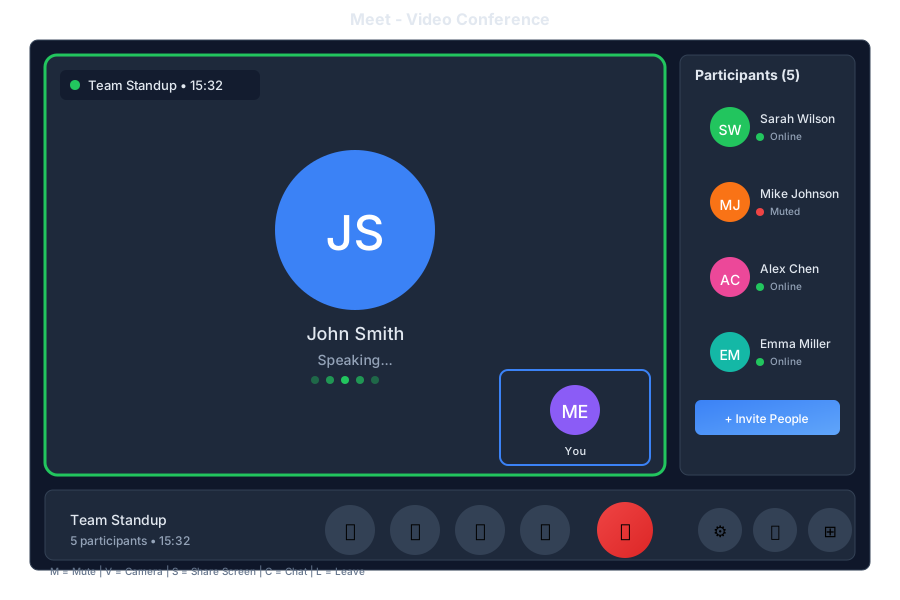
Overview
Meet is the video conferencing app in General Bots Suite. Host video calls, share your screen, collaborate in real-time, and let the AI take notes for you. Meet integrates seamlessly with Calendar so joining meetings is just one click away.
Features
Meeting Controls
| Control | Description |
|---|---|
| 🎤 Mute | Toggle microphone |
| 📹 Video | Toggle camera |
| 🖥️ Share | Share screen |
| ✋ Raise Hand | Get attention |
| 💬 Chat | In-meeting chat |
| 👥 Participants | View attendees |
| ⚙️ Settings | Audio/video settings |
| 📞 Leave | End call |
Meeting Features
| Feature | Description |
|---|---|
| Screen Sharing | Share your entire screen or specific window |
| Recording | Record meetings for later review |
| Chat | Send messages during the meeting |
| Reactions | Quick emoji reactions |
| Raise Hand | Queue to speak |
| Breakout Rooms | Split into smaller groups |
| AI Notes | Automatic meeting notes |
| Transcription | Live captions |
Layouts
| Layout | Best For |
|---|---|
| Gallery | Group discussions |
| Speaker | Presentations |
| Sidebar | Screen sharing |
| Spotlight | Featured speaker |
Keyboard Shortcuts
| Shortcut | Action |
|---|---|
M |
Toggle mute |
V |
Toggle video |
S |
Share screen |
H |
Raise/lower hand |
C |
Toggle chat |
P |
Toggle participants |
R |
Start/stop recording |
Space |
Push to talk (when muted) |
Escape |
Exit fullscreen |
Meetings via Chat
Starting a Meeting
Start a video call
🎥 Meeting room ready!
📍 Room: Team Huddle
🔗 Link: https://meet.gb/abc-123
Click to join or share the link with others.
[🚀 Join Now]
Inviting Participants
Invite Sarah and John to the meeting
✅ Invitations sent!
📧 Sarah - invited
📧 John - invited
They'll receive a link to join.
Scheduling a Meeting
Schedule a video call with the team for tomorrow at 3pm
✅ Meeting scheduled!
🎥 Team Video Call
📅 Tomorrow at 3:00 PM
👥 Invitations sent to team members
🔗 Link: https://meet.gb/xyz-789
Added to your calendar with reminder.
Getting Meeting Notes
What were the key points from today's meeting?
📝 Meeting Summary - Team Sync
Duration: 45 minutes
Participants: 5
---
📌 Key Points:
• Project deadline moved to next Friday
• Budget approved for new tools
• Sarah will lead the client presentation
---
✅ Action Items:
• John: Update project timeline
• You: Review proposal by Wednesday
Recording Access
Show me the recording from yesterday's meeting
🎬 Meeting Recording
📅 Yesterday - Project Review
⏱️ Duration: 1:15:32
📁 Saved to: My Drive/Recordings
[▶️ Play] [⬇️ Download] [🔗 Share]
API Endpoints
| Endpoint | Method | Description |
|---|---|---|
/api/meet/rooms |
GET | List meeting rooms |
/api/meet/rooms |
POST | Create room |
/api/meet/rooms/:id |
GET | Get room details |
/api/meet/rooms/:id/join |
POST | Join meeting |
/api/meet/rooms/:id/leave |
POST | Leave meeting |
/api/meet/rooms/:id/invite |
POST | Invite participants |
/api/meet/recordings |
GET | List recordings |
/api/meet/recordings/:id |
GET | Get recording |
Create Room Request
{
    "name": "Team Sync",
    "scheduled": "2025-05-16T15:00:00Z",
    "duration": 60,
    "participants": ["sarah@company.com", "john@company.com"],
    "settings": {
        "recording": true,
        "transcription": true,
        "waitingRoom": false
    }
}
Room Response
{
    "id": "room-abc123",
    "name": "Team Sync",
    "url": "https://meet.gb/abc-123",
    "host": "you@company.com",
    "scheduled": "2025-05-16T15:00:00Z",
    "status": "scheduled",
    "participants": [
        {
            "email": "sarah@company.com",
            "status": "invited"
        }
    ],
    "settings": {
        "recording": true,
        "transcription": true
    }
}
Configuration
Configure Meet in config.csv:
key,value
meet-provider,livekit
meet-server-url,wss://localhost:7880
meet-recording-enabled,true
meet-transcription-enabled,true
meet-max-participants,50
Requirements
Browser Support
- Chrome 90+
- Firefox 88+
- Safari 14+
- Edge 90+
Hardware
- Webcam (optional)
- Microphone
- Speakers or headphones
- Stable internet connection
Permissions
Allow browser access to:
- Camera
- Microphone
- Screen sharing (when needed)
Troubleshooting
No Audio/Video
- Check browser permissions
- Verify correct device selected in settings
- Try refreshing the page
- Check if another app is using the camera
Poor Quality
- Check internet connection speed
- Close other bandwidth-heavy applications
- Try disabling HD video
- Move closer to your router
Can't Join Meeting
- Verify the meeting link is correct
- Check if meeting has started
- Ensure you're not blocked by waiting room
- Try a different browser
Recording Not Working
- Verify recording is enabled for the room
- Check storage quota
- Ensure you have host permissions
See Also
- Suite Manual - Complete user guide
- Calendar App - Schedule meetings
- Chat App - Quick calls from chat
- Calls API - API reference